Loading A Custom Box Model in MusicBox#
MusicBox provides two primary ways to load custom box models:
Loading a pre-made example configuration
Loading your own JSON configuration file
This tutorial covers both approaches.
Note: Configuration files define all aspects of your box model, including initial and evolving conditions, simulation parameters, and the complete mechanism (species, reactions, and phases).
1. Loading Pre-made Box Model Examples#
MusicBox includes several built-in example configurations accessible through the Examples class. Each example has a path attribute that points to its JSON configuration file.
You can load an example using the loadJson() method, which takes the configuration path as a parameter.
The available examples include:
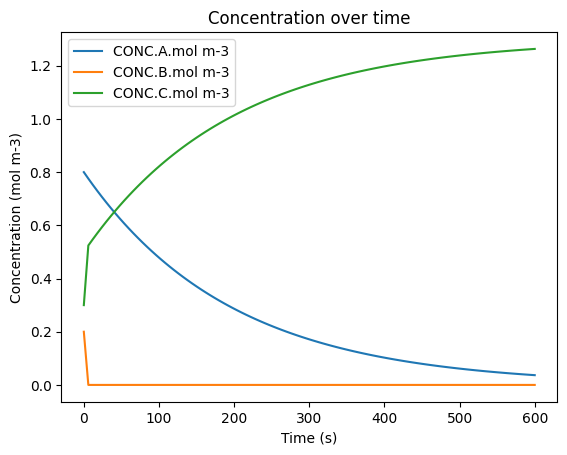
The code below demonstrates the Analytical example. You can try any other example by replacing Analytical with a different name in Examples.Analytical.path.
To load, run, and visualize an example box model:
[ ]:
from acom_music_box import MusicBox, Examples
import matplotlib.pyplot as plt
import logging
import sys

# Disable logging to reduce output noise
logging.disable(sys.maxsize)

# Create a MusicBox instance and load the Analytical example
box_model = MusicBox()
conditions_path = Examples.Analytical.path
box_model.loadJson(conditions_path)

# Solve the box model and display results
df = box_model.solve()
display(df)

# Plot the species concentrations over time
df.plot(x='time.s', y=['CONC.A.mol m-3', 'CONC.B.mol m-3', 'CONC.C.mol m-3'],
        title='Concentration over time',
        ylabel='Concentration (mol m-3)',
        xlabel='Time (s)')
plt.show()
| time.s | ENV.temperature.K | ENV.pressure.Pa | ENV.air number density.mol m-3 | CONC.A.mol m-3 | CONC.B.mol m-3 | CONC.C.mol m-3 | |
|---|---|---|---|---|---|---|---|
| 0 | 0.0 | 200.0 | 70000.0 | 42.095324 | 0.800000 | 2.000000e-01 | 0.300000 |
| 1 | 6.0 | 200.0 | 70000.0 | 42.095324 | 0.775723 | 3.979221e-08 | 0.524277 |
| 2 | 12.0 | 200.0 | 70000.0 | 42.095324 | 0.752182 | 3.858465e-08 | 0.547818 |
| 3 | 18.0 | 200.0 | 70000.0 | 42.095324 | 0.729356 | 3.741374e-08 | 0.570644 |
| 4 | 24.0 | 200.0 | 70000.0 | 42.095324 | 0.707222 | 3.627836e-08 | 0.592777 |
| ... | ... | ... | ... | ... | ... | ... | ... |
| 96 | 576.0 | 200.0 | 70000.0 | 42.095324 | 0.041522 | 2.129939e-09 | 1.258478 |
| 97 | 582.0 | 200.0 | 70000.0 | 42.095324 | 0.040262 | 2.065302e-09 | 1.259738 |
| 98 | 588.0 | 200.0 | 70000.0 | 42.095324 | 0.039040 | 2.002627e-09 | 1.260960 |
| 99 | 594.0 | 200.0 | 70000.0 | 42.095324 | 0.037855 | 1.941854e-09 | 1.262145 |
| 100 | 600.0 | 200.0 | 70000.0 | 42.095324 | 0.036706 | 1.882926e-09 | 1.263294 |
101 rows × 7 columns
2. Loading a Custom JSON Box Model Configuration#
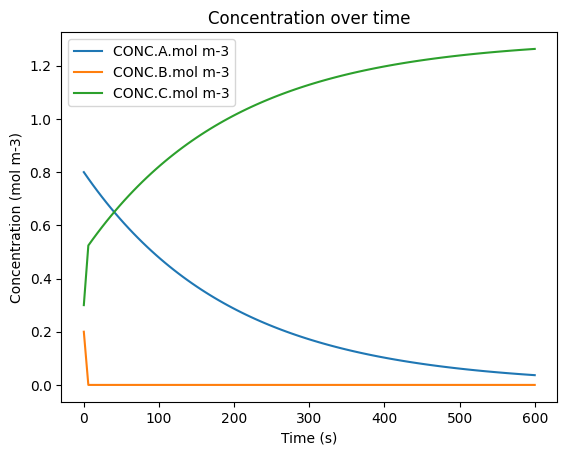
Loading your own JSON configuration file works the same way as loading a pre-made example. Simply provide the path to your custom configuration file instead of using the Examples class.
The example below loads a file called custom_box_model.json from the config subfolder:
[ ]:
from acom_music_box import MusicBox
import matplotlib.pyplot as plt
import logging
import sys

# Disable logging to reduce output noise
logging.disable(sys.maxsize)

# Create a MusicBox instance and load the custom configuration
box_model = MusicBox()
conditions_path = "config/custom_box_model.json"
box_model.loadJson(conditions_path)

# Solve the box model and display results
df = box_model.solve()
display(df)

# Plot the species concentrations over time
df.plot(x='time.s', y=['CONC.A.mol m-3', 'CONC.B.mol m-3', 'CONC.C.mol m-3'],
        title='Concentration over time',
        ylabel='Concentration (mol m-3)',
        xlabel='Time (s)')
plt.show()
Simulation Progress: 0%| | 0/600.0 [00:00<?, ? [model integration steps (2.0 s)]/s]
| time.s | ENV.temperature.K | ENV.pressure.Pa | ENV.air number density.mol m-3 | CONC.A.mol m-3 | CONC.B.mol m-3 | CONC.C.mol m-3 | |
|---|---|---|---|---|---|---|---|
| 0 | 0.0 | 200.0 | 70000.0 | 42.095324 | 0.800000 | 2.000000e-01 | 0.300000 |
| 1 | 6.0 | 200.0 | 70000.0 | 42.095324 | 0.775723 | 3.979221e-08 | 0.524277 |
| 2 | 12.0 | 200.0 | 70000.0 | 42.095324 | 0.752182 | 3.858465e-08 | 0.547818 |
| 3 | 18.0 | 200.0 | 70000.0 | 42.095324 | 0.729356 | 3.741374e-08 | 0.570644 |
| 4 | 24.0 | 200.0 | 70000.0 | 42.095324 | 0.707222 | 3.627836e-08 | 0.592777 |
| ... | ... | ... | ... | ... | ... | ... | ... |
| 96 | 576.0 | 200.0 | 70000.0 | 42.095324 | 0.041522 | 2.129939e-09 | 1.258478 |
| 97 | 582.0 | 200.0 | 70000.0 | 42.095324 | 0.040262 | 2.065302e-09 | 1.259738 |
| 98 | 588.0 | 200.0 | 70000.0 | 42.095324 | 0.039040 | 2.002627e-09 | 1.260960 |
| 99 | 594.0 | 200.0 | 70000.0 | 42.095324 | 0.037855 | 1.941854e-09 | 1.262145 |
| 100 | 600.0 | 200.0 | 70000.0 | 42.095324 | 0.036706 | 1.882926e-09 | 1.263294 |
101 rows × 7 columns